ComC: Copy live sections into Webflow for faster prototyping
ComC, developed by Jetmir Kojqiqi, is a Chrome extension that helps Webflow designers and agencies capture website sections and import them into the Webflow Designer as editable components. The extension uses a hover-and-select interface to copy page sections, attempts to recreate responsive structure, and processes images and buttons automatically. It targets Webflow designers, freelancers, and no-code builders who want quicker visual prototyping without creating layouts from scratch.
What ComC does for Webflow-focused layout work
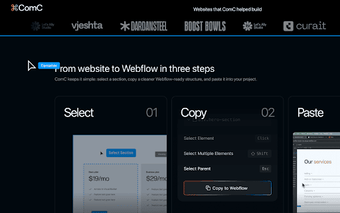
ComC turns visible page sections into paste-ready Webflow components by letting the user hover to select an area, click to capture it, and use a Copy-to-Webflow action. The extension preserves editability so designers can modify the result inside the Webflow Designer, and it attempts to map elements into responsive structures rather than exporting a static image or flattened markup. This workflow reduces manual recreation of common marketing sections.
How much cleanup is usually required after importing
The tool performs best on clean landing pages, SaaS sites, and portfolio pages, and it can require manual adjustment for pages with heavy animations or custom scripts. Beta notes say class naming and asset handling are being improved, which explains occasional mismatches. Designers should expect to inspect class assignments and layout breakpoints after pasting, especially when source sites use complex CSS or JavaScript-driven layouts.
How it fits into desktop Chromium workflows and account models
The extension runs in Chrome and other Chromium-based desktop browsers, and it does not require account creation during the beta, so there is no cloud account step to enable the basic capture workflow. It also processes images, icons, and buttons when building the component, giving a practical starting point that designers can refine locally in their Webflow projects without an intermediate signup requirement.
Who benefits and what the beta status means for teams
ComC is aimed at Webflow designers, agencies, freelancers, and no-code builders who sample web layouts for inspiration and rapid prototyping. The developer is actively iterating on accuracy, so teams that adopt the extension should treat it as an experimental tool and plan a short validation pass after import. Its desktop-only, Chromium requirement means teams that standardize on other browsers must use a compatible client to run the extension.
Practical choice for rapid prototyping with a trade-off on polish
ComC is a pragmatic beta tool for Webflow practitioners who want to speed idea exploration by sampling real pages; the trade-off is that pasted components often need careful review and occasional refactoring. Use it against small test projects or a staging site, check class names and breakpoints after import, and accept that the extension is best as an accelerator for prototyping rather than a drop-in production generator.